Showing posts with label windows tips. Show all posts

Sep 23, 2009

Chrome Run Inside Internet Explorer

Google is now trying to run It's browser Chrome within inside the IE. It is an open source plug-in that brings HTML5 and other open web technologies to Internet Explorer.

software engineers says that they are building Google Chrome Frame to help web developers deliver faster, richer applications like Google Wave. Recent JavaScript performance improvements and the emergence of HTML5 have enabled web applications to do things that could previously only be done by desktop software. One challenge developers face in using these new technologies is that they are not yet supported by Internet Explorer.

With the Google Chrome Frame, users will actually be running Chrome inside Internet Explorer, taking advantage of the latest version of the Webkit rendering engine and Google’s speedy V8 JavaScript engine.

The new plugin will enable users to enjoy latest web technologies, like the ones from the proposed HTML 5 standard, which most modern browsers. The plugin is a 500 KB download after which it will download an additional 10 MB or so of data.

Google Chrome Frame for Internet Explorer is available for Download here.

Jun 22, 2009

Download Youtube videos to computer > Online and Offline

Some of you still wonder about how to download youtube videos from youtube web site to your computer. There are various ways that lets you download videos to desktop.

However not youtube it self allows it's users to download content. But this may change in future and also there is a rumor that they will soon lets download videos.

I mostly like to do it with online applications :
http://deturl.com : allows you to download videos in MP4 format and FLV format.
http://vixy.net : download and converts youtube videos in MPEG4/AVI/MOV/MP4/MP3/3GP

Offline / Desktop downloaders
Youtube Get - downloads from destop
Youtube Grabber
Firefox extension - Video Download helper
Greasemonkey script - download from youtube it self

May 7, 2009

Windows Password Recovery

You may sometimes struggle on how to find the windows password you have lost. Windows passwords are stored in a system file called 'SAM' file which records all of our login, log off and other Windows security related information.

There are several ways to find your lost passwords. One that is most secure and successful is using MD crack and Pwdump tools.

I have found good article which tells you how to recover Windows passwords in few simple steps. Go here to view it in details.

Apr 27, 2009

Best ever high definition Wallpapers collection by Dexzone

Here is an best ever High Definition, Widescreen wallpaper collection of several categories taken by dexzone. this wallpapers includes the images and wallpapers of pretty celebrity emotional Emma Watson, High Quality Nature Wallpapers, Japan Digital Arts, Amazing Landscape Wallpapers and other miscellaneous Unique wallpapers.
For a full list free Wallpapers Go to : Dexzone


japan digital wallpapers


HD nature wallpapersHD nature wallpapers


HD nature wallpapers

HD nature

Feb 13, 2009

What's new in Windows 7

Windows 7, Microsoft newer version of next operating system.
Microsoft has now released the beta version of Windows 7 to test and get used.
View official announcements of windows 7 Beta release here.
Windows 7 is available to download from other internet sources.
also 64bit version of windows 7 has leaked to the internet on last january07 2009.

Microsoft seems to be focusing more on functionality of the windows 7 as the company says The decision to use the name Windows 7 is about simplicity and it will enable users to "work the way you want," "make everyday tasks faster and easier," and "make new things possible."

The Improvements of Windows 7
One of the main aim of Windows 7 developers is to making it fully compatible with
new device drivers, applications, and hardware.
It has many improvements in fast boot time and shutting down, working with applications and files, opening and closing applications, works better with latest multi core processors, working and editing multimedia files and improved security center.

What has developed and new features:

  • Improed Windows Medis Center
  • Windows Explorer
  • Control Panel : Clear Type Text Tuner, Display Color Calibration Wizard, Gadgets, Recovery, Troubleshooting, Workspaces Center, Location and Other Sensors, Credential Manager, Biometric Devices, System Icons,
  • Action Center ( Replaces Old Security Center, with added features.
  • New Task Bar ( It is the one of the biggest visual change of Windows 7 - "The taskbar at the bottom of your screen is what you use to switch between the applications you've got open. In Windows 7 you can set the order in which the icons appear and they'll stay put. They're easier to see, too. Click once on the new large icons or bigger preview thumbnails and you're ready to go. You can even see a full screen preview before switching to the window."
New Windows7 Task bar scrren shots.


System Requirements for Windows 7

Recommended requirements.
Processor -
1 GHz (Either 32-bit or 64-bit)
RAM - 1GB memory
Graphics card - 128 MB
HD Drive free space - 16GB
Others - DVD Rom and Audio Output

In addition to that new windows 7 has removed some features of earlier versions. Such as.
Classical windows user interface, Windows mini player - now integrated with task bar, sidebar, moviemaker - replaces with Windows Live.

Feb 9, 2009

Host files with Gmail

Gmail, The Google's web mail service is exactly a handy solution to give a backup to your important files and data.
So you can access files uploaded to your 07 GB Gmail account anywhere in the world.
Actually files are uploaded as mail attachments. Maximum size of an attachment is around 10 MB.
But you have to limited within 6 or 7 MB as Gnail wnats some space for 'Encoding' the file for security reasons (also you can turn this off).
There are also some handy tools which makes uploading files easier.

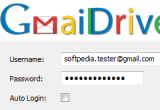
Gmail Drive
GMail Drive creates a virtual filesystem around your Google GMail account, allowing you to use GMail as a storage medium.
After installing Gmail drive You can see another drive within the 'My Computer' Which allows you to copy and paste or drag and drop files to that drive easily.
When you create a new file using GMail Drive, it generates an e-mail and posts it to your Mail account. The Email appears in your normal Inbox folder, and the file is attached as an e-mail attachment.

GMail Drive creates a virtual filesystem on top of your Google GMail account and enables you to save and retrieve files stored on your GMail account directly from inside Windows desktop.

Download the latest bugfixes version of Gmail drive
Official web site

More Gmail tools
Firefox Extensions to better manage your Gmail account.
You will be amazed by looking at Firefox's addons for Gmail and do magic with your Gmail account.
There area godd collection of firefox addons to manage your Gmail accounts in one location.
They allows you to upload files to the Gmail account, Manage multiple Gmail accounts,
checking multiple accounts for mails in once, block ads appeared within Gmail, add other extra features to Gmail accounts, and lot more.

Download Firefox extensions for Gmail.

Gmail Notifier
Supports checking multiple accounts as well as Gmail Hosted accounts.

Better Gmail
A compilation of the best Greasemonkey Gmail enhancements in one extension.

Gmail Ad blocker
Block ads appeared within your Gmail account
Gmail Ad blocker, more screen space! Those Gmail text advertisements can take up a lot of space and are not blocked by other addons. More screen space for your messages.

Better Gmail 2
Add useful extra features to Gmail, like hierarchical labels, macros, file attachment icons, and more.

Xoopit for Gmail
Upgrade Gmail to search, browse & share files, photos & videos. Use Google Search while composing mail in Gmail. Get information about people in a Gmail conversation. Xoopit works for Gmail, Google Mail and Google Apps users.

Gmail Manager
The original Gmail notifier for multiple accounts. Allows you to manage multiple Gmail accounts and receive new mail notifications. Displays your account details including unread messages, saved drafts, spam messages, labels with new mail, space used, and new mail snippets.

Blank Canvas Gmail Signatures
Automatically inserts HTML signatures into your Gmail messages based on which address you are sending from. Supports up to four signatures for each address you have set up. Works for Compose Message and Reply/Forward. Installation Guide: http://blankcanvasweb.com/pages/detail/id_16/n_install_guide/

Email This! Bookmarklet Extension
Email This! will send your recipient the link, title, & highlighted text of the page you are viewing using GMail, Google Apps GMail, Yahoo, and Stand-Alone Mail Clients like Outlook Express, Thunderbird, & More.

Gspace
Another handy tool for Gmail.
This extension allows you to use your Gmail Space (7 GB and growing) for file storage. It acts as an online drive, so you can upload files from your hard drive and access them from every Internet capable system.

Oct 27, 2008

Optimize and Free up the RAM using FreeRAM XP Pro 1.5

Are going to upgrade your RAM due to low performance. Give a try to FreeRAM XP Pro.
FreeRAM XP Pro includes automatic memory monitoring and optimization; advanced tray support; fast, threaded freeing with a stop option; multiple system-metric monitors; a simple and attractive GUI; memory reporting and diagnostic logging; and real-time memory information. FreeRAM XP Pro's AutoFree feature intelligently scales how much RAM is freed with your current system status, thus optimizing RAM without slowing down your computer. FreeRAM XP Pro has been designed to be easy to use yet highly customizable by computer novices and experts alike.

The new version (1.5)introduces Global Memory Compression technology, which frees additional RAM instantly, at no cost to system performance; process memory reporting; advanced memory configuration options; customizable program sounds; and miscellaneous features and fixes.

Includes automatic memory monitoring and optimization; advanced tray support; fast, threaded freeing with a stop option; multiple system-metric monitors; a simple and attractive GUI; memory reporting and diagnostic logging; and real-time memory information.
It's freeware and nothing to lost you.

Download from Download.com

Jul 21, 2008

nBinder, executable compressor file binder and a password protector

nBinder allows you to pack and compress an unlimited number of files, maintaining their direct functionality. You also have available options like password protection, compression level, folder protection, URL files, complex commands, self removal, controls based on conditions that allow for conditional run, repetitive sequences and scheduled events, individual file options and more advanced options.

The primary disadvantage of common archives (.zip .rar .ace etc.) is that once files have been archived they loose their direct functionality, meaning they first have to be unpacked using the application used to compress them and the run. nBinder comes to fix this problem combining the advantages of archives with the direct functionality of the uncompressed files and many more other options like password protection and anti hacking protection for executables or complex commands that enhance functionality. Files compressed with nBinder are transformed into standalone executable files (.exe) that when executed they act the same as the packed files would if run uncompressed, maintaining their full direct functionality.
For example a packed movie when run will open the movie into its default application, without the user having to decompress it first. You can use the files compressed (binded, protected) by nBinder without having nBinder or other application installed on the computer. You can later extract the packed files from the output file either by using nBinder or by running the output file with a certain command line.

Award-winning file packer, compressor and protector used to pack multiple files into a stand alone executable with over 50 advanced output and file unpack options, conditional run and commands.

Download:
nBinder web site

'Cacheman XP', improve the XP performance speed

CachemanXP is a Windows tuneup utility designed to improve the speed and stability of your computer by optimizing caches, recovering RAM and fine tuning a number of system settings. Oneclick-Optimization makes it suitable for novice and intermediate users yet it is also powerful and versatile enough for computer experts.
Unlike other tuneup utilities, CachemanXP runs as a system service, minimizing resource usage and tweaking Windows at system-level.


Useful Functions of cacheman XP :
* CachemanXP displays a list of loaded Windows processes (Applications and System Services) along with detailed information including RAM usage.

* The most important CachemanXP process feature is Kill Process.
which stops the process when the 'task manager' is being ignored.

* RAM-Recovery
Inactive or crashed programs are simply moved from your physical memory (RAM) to a space on your Hard Drive called the Paging File (=Swap File).

*What does CachemanXP differently?
CachemanXP will not wait with the recovery until your system runs completely out of RAM. You can configure at which state (below value) CachemanXP should perform the recovery process. The postpone recovery on high system activity option ensures that no recovery happens if you are working on an important task and do not want to be disturbed. CachemanXP will wait until the job is done and perform the recovery thereafter. Since the recovery happens earlier as usual your system will have enough RAM available a much longer time.

Download from:
http://cachemanxp.outertech.com

Ultimate windows password cracker, the Cain 4.9.19 released

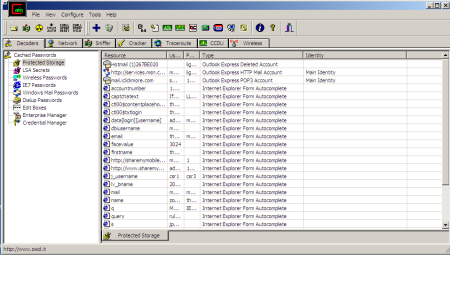
Cain & Abel is a password recovery tool for Microsoft Operating Systems. It allows easy recovery of various kind of passwords by sniffing the network, cracking encrypted passwords using Dictionary, Brute-Force and Cryptanalysis attacks, recording VoIP conversations, decoding scrambled passwords, recovering wireless network keys, revealing password boxes, uncovering cached passwords and analyzing routing protocols. The program does not exploit any software vulnerabilities or bugs that could not be fixed with little effort.

It covers some security aspects/weakness present in protocol's standards, authentication methods and caching mechanisms; its main purpose is the simplified recovery of passwords and credentials from various sources, however it also ships some "non standard" utilities for Microsoft Windows users.

The latest version is faster and contains a lot of new features like APR (Arp Poison Routing) which enables sniffing on switched LANs and Man-in-the-Middle attacks. The sniffer in this version can also analyze encrypted protocols such as SSH-1 and HTTPS, and contains filters to capture credentials from a wide range of authentication mechanisms. The new version also ships routing protocols authentication monitors and routes extractors, dictionary and brute-force crackers for all common hashing algorithms and for several specific authentications, password/hash calculators, cryptanalysis attacks, password decoders and some not so common utilities related to network and system security.

Don't worry about the price. It is completely free !
Download Cain & Abel here

Jul 18, 2008

Reset administrator passwords and Upgrade limited accounts as Administrator accounts

pclogin nowHow can you gain access to a Windows computer if you forgot the administrator's password?
How can you get out of this situation without formatting and re-installing the operating system?


PCLoginNow
is an easy-to-use tool to reset local administrator and other accounts passwords on Windows system. No need to reinstall the system. It resets Windows passwords and Windows security settings instantly.

PCLoginNow can also help you maintain, change accounts policy setting and properties. You can easily upgrades an general account to administrator level, lock or unlock those accounts you don't need anymore, And moreover, all of these are done without booting your tedious, time-comsuming Windows System.

Even though the system registry is protected by Syskey, PCLoginNow can easily bypass this mechanism and reset the Windows passwords.


PC Login Now is released as a freeware now.
Everyone can download PC Login Now (Full version) and use it for free.

Download from:
Sourceforge
Original web site

Jul 17, 2008

Rar Password recovery (recover your rar passwords)

Advanced RAR Password Recovery (ARPR) is a password retrieval program for the RAR/WinRAR archiving format.At the moment, there is no known method to extract the password from the compressed file. so the only available methods are "brute force" and dictionary-based attacks.

some features of rar password recovery:

  • ARPR can work in the background, using the CPU only when it is in an idle state;
  • supported all versions of win rar archives including rar3.x
  • Supports the customizable "brute-force" and dictionary-based attacks.
  • Multilanguage interface is provided.

Just select the name of RAR archive you'd like to get the password for. Use the "Browse" button (or F3 key) to select it, or press the "recent files" button (with a small down arrow) to puck up from the list (if you ever used ARPR before). Alternatively, you can use drag'n'drop – just drag the file (with a mouse) from Windows Explorer, and drop it to ARPR window. If all the settings are correct, the attack will be started immediately.

http://www.elcomsoft.com/

Jul 6, 2008

Top 10 windows management tools (continue..)

Top 10 windows management tools

Continue from last post........


4. Mcafee Avert Stinger
Stinger is a stand-alone utility used to detect and remove specific viruses. It is not a substitute for full
anti-virus protection, but rather a small tool to assist administrators and users when dealing with an infected
system. Stinger utilizes next generation scan engine technology, including process scanning, digitally signed
DAT files, and scan performance optimizations.
Download : Avert Stinger


5. Mcafee Site Advisor
SiteAdvisor's automated robots tests every Web site, download, and e-mail sign-up form on the Web.
Web sites are tested for 'phishing' and other online scams, affiliations with dangerous sites, excessive pop-ups, and browser exploits.


and it tells you:
  • Is it safe to use?
  • Is it safe to download?
  • Is it safe to submit e-mail or other data ?
  • What do others say about the site ?
  • and shows the more details.
Download : siteadvisor.com


6. Power Quest Partition Magic.
You don't need any other tool to manupulate your disks and partiotions, if you have Partiotion Magic software.
you can quickly and easily create partitions, which act as "file drawers," on your hard disks for storing valuable information such as data files, applications, and operating systems.
Storing information in separate partitions helps you organize and protect your data, safely run multiple operating systems, and reclaim wasted disk space.
PartitionMagic enables you to secure your data by physically separating it from other files. Separate partitions also make backups to networks and removable drives easy.

You also able to create rescue disks with PM.
Download : Partiotion Magic (power quest partition magic no longer exists, It's acquired by Norton, But you can downlad power quest from other sources. Just google it !)

7. Diskeeper (Disk keeper)
Diskeeper 2008 features automatic defragmentation, which means fragmentation is now solved as it occurs, in real time. It is possible to defragment hard drives without clumsy or long maintenance processes.
Scheduled defragment processes are a thing of the past.
Diskeeper 2008 only utilizes untapped, unused resources to defrag your volumes.
PC performance and productivity are never impacted by the consolidation of free space on your drives.
Download : diskeeper

Jul 5, 2008

Top 10 windows management tools

windows xpThis is our first article on windows XP hacks.
here the term hacks not means that any hacking or cracking activities with your xp system.
Rather We tells you how to prevent from such hackers and crackers.
Plus best tools and tricks to make a smoothly running windows XP.


So first we take out some windows management tools.
Here is the best Windows tools ever.

regcure1. Regcure.
It scans the whole registry and shows all errors.
You also has the option to view all start-up items of the computer and stop unneccesary items.
I'm using it for a long time and is the best registry cleaner.
Regcure finds all junky items, which keeps intact by other tools such as norton,pc on point, and reg mechanic.

"RegCure™ provides fast and efficient scanning and cleaning of your registry so that your computer can run at an optimal level of performance. RegCure identifies invalid registry items and you decide what items you want to remove. After removing registry entries, you have the option to restore your computer to a previous state."
Download "regcure" here

ccleaner2. CCleaner.
(registry optimizer and removes unnessary files)

It has the ability to detect errors of the registry and scan the computer for unnessary files.
also to view startup objects and stop them.

It's uninstaller is a worthy tool which shows items that does not removed by 'add or remove' program
Download 'CCleaner" here


spybot3. Spy Bot
Spy bot is an uncomparrable tool to remove
all malware, adware and also it removes viruses.

You can detect and remove some threats which does not remove by some giant virus scanners such as kaspersky.
I have a my own experiance.
My computer was infected by a malware called "virtumonde".
Kaspersky detected some of "virtumonde" files and removes only part of it, keeping core files intact within the system.
I downloaded the "spybot" and make a scan.
"spybot" scanned the computer and detected the core "virtumonde" files and ultimately destroied them.
It also featured with a file shredder.

Download "spybot" here

Read the part two here

colombo pro